Website Development for a Real Estate Agency: Structure and Essential Features
июль 30, 2026
•
7 minutes
Content
Why Clients Study a Real Estate Agency’s Website Before Calling
What Tasks Should a Real Estate Agency Website Solve?
How to Choose the Right Website Format
Real Estate Agency Website Structure
Homepage
Property Catalog
Which Filters Should Be Included?
Property Page
Property Map
User Account
Agent Account and Property Management
Website Integration with CRM
Automatic Property Updates
Inquiry Forms and Contact Methods
SEO for a Real Estate Agency Website
Preparing the Website for AI Search
Analytics and Conversion Tracking
Mobile Version and Loading Speed
Security and Data Protection
Template Website or Custom Development
Development Stages
What Determines Development Cost?
Common Development Mistakes
How to Prepare a Technical Specification
Conclusion
Frequently Asked Questions
Why Clients Study a Real Estate Agency’s Website Before Calling
Before calling or submitting an inquiry, a potential client almost always visits the agency’s website. There, they assess the selection of properties, ease of search, photo quality, presentation of listings, and the overall trustworthiness of the brand. In practice, the website becomes the first meeting with the company, and this first impression determines whether the person proceeds to contact a manager.
If the website is outdated, loads slowly, or makes properties difficult to find, the entire marketing system suffers. SEO brings organic traffic, contextual advertising generates paid visits, but an inconvenient interface and outdated listings undermine their results. Even a large property catalog will not generate inquiries if filters work poorly, information is not updated, and contact forms frustrate users.
That is why developing a website for a real estate agency should begin not with choosing a design, but with studying the audience, services, property structure, traffic sources, and the company’s internal processes. A website is not just an image — it is a working sales tool and should be designed accordingly.
What Tasks Should a Real Estate Agency Website Solve?
A simple corporate website answers only one question: does the company exist, and how can it be contacted? A modern real estate agency website solves many more tasks and is integrated into the daily work of the sales and marketing teams.
• Attract organic and paid traffic from buyers and tenants.
• Help users quickly find suitable properties and proceed to contact.
• Build trust in the agency and its specialists through case studies, reviews, and expert content.
• Collect inquiries for buying, selling, and renting real estate and distribute them among employees.
• Send inquiries and user actions to the CRM while preserving the traffic source and advertising campaign data.
• Automate property publication and updates, reducing routine work for sales agents.
• Provide data for analytics, marketing, and repeated communication with clients.
The difference between a simple corporate website and a full-featured system is fundamental: the first merely exists online, while the second generates inquiries every day and saves employees’ time.
How to Choose the Right Website Format
There is no single correct format. It depends on the business model, number of properties, geographical coverage, and development plans. Several common scenarios are used most often.
• A corporate real estate agency website with a property catalog — a universal solution for full-service companies.
• A specialized apartment sales website or a separate rental website when one direction clearly dominates.
• A commercial real estate website with its own set of characteristics and search scenarios.
• A developer or residential complex website focused on new developments and construction phases.
• A large real estate portal or marketplace if the project will work with external sellers and large volumes of data.
• Landing pages for specific services, districts, or projects as an addition to the main website for advertising and SEO.
In practice, these formats are often combined. A small agency can start with a corporate website and landing pages, then expand the catalog as its property database grows.
Real Estate Agency Website Structure
A well-designed structure helps both users and search engines. Every section should either attract traffic or convert visitors into inquiries.
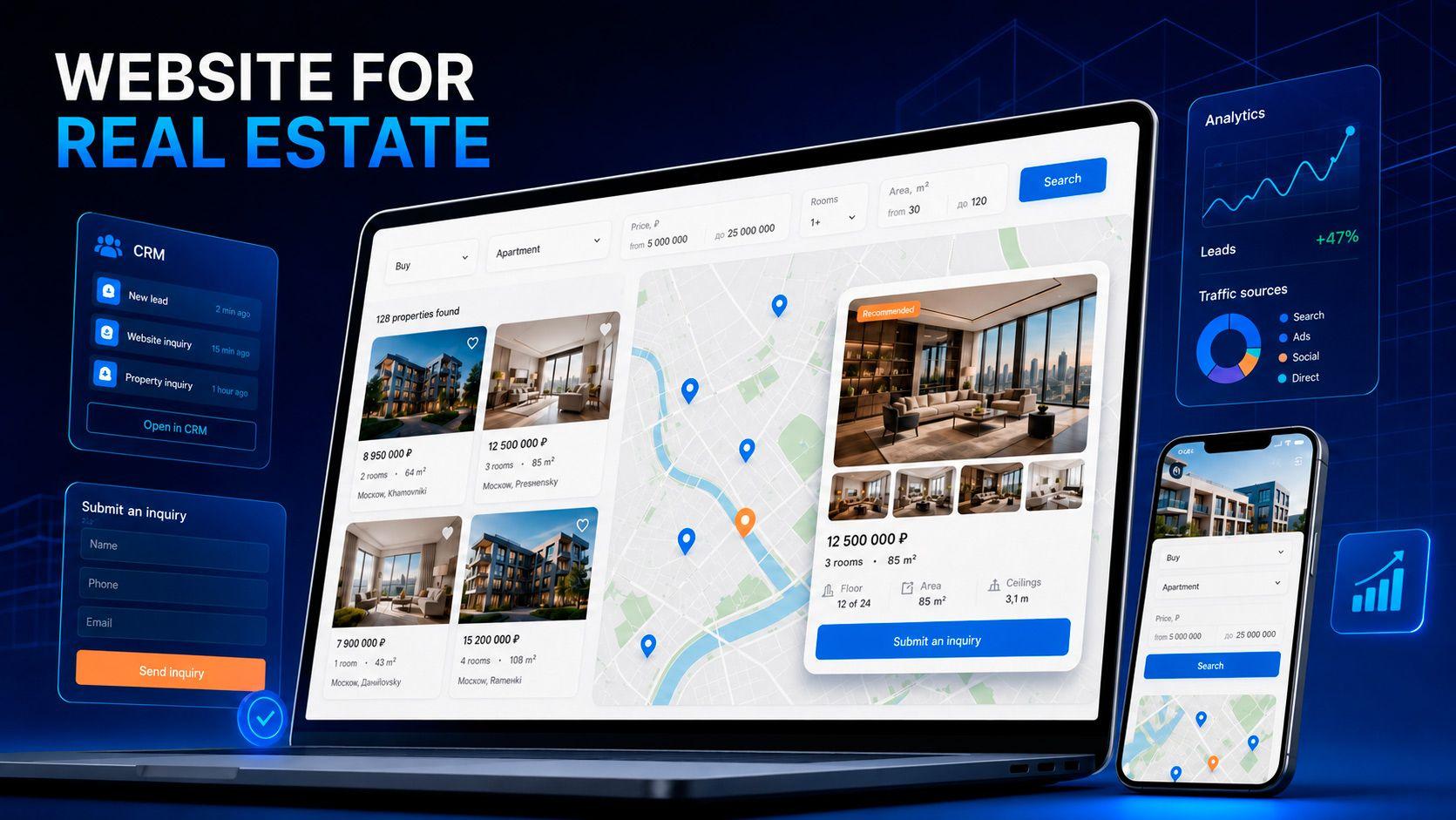
The homepage is responsible for positioning and initial search, guiding visitors toward the catalog and inquiry forms. The property catalog with search and filters is the main tool for converting visitors into contacts. Category pages for apartments, houses, land, and commercial property, as well as separate sales and rental sections, serve as search entry points and clarify user intent. The property page is the key conversion page where the visitor decides whether to make an inquiry.
Service sections covering sales, purchasing, rentals, property valuation, and transaction support attract traffic from commercial queries and strengthen trust. New development showcases and district pages serve as SEO landing pages for location-based searches. Company, team, and agent pages build credibility and are especially important for visibility in AI-powered search. Reviews and case studies provide social proof, while a blog and FAQ section attract informational traffic. Contact pages and privacy policies complete the user journey and satisfy legal requirements.
Homepage
The homepage should explain within a few seconds what the agency does, where it operates, and what action the visitor is expected to take. Appropriate elements include clear positioning, a property search bar or form, main service areas, selections of current listings, company advantages, information about agents, reviews and completed transactions, useful materials, and a clear call to action.
A common mistake is turning the homepage into an overloaded catalog. Its role is not to show everything at once, but to quickly orient the visitor and direct them to the appropriate section or inquiry form.
Property Catalog
The catalog is the heart of a real estate agency website. The number of inquiries directly depends on how convenient it is. A good catalog provides fast search, clear switching between sales and rentals, sorting by price, publication date, area, and other parameters, as well as preserving selected filters when navigating between pages.
Users should be able to view properties in a list or on a map, add listings to favorites, and compare them when necessary. Preview cards should be informative and include the price, key characteristics, and a high-quality photo. Proper mobile performance and fast loading speed are essential.
Filters should reflect real search behavior rather than mechanically repeat every field in the database. A user searches for an apartment by price, district, and number of rooms, not by internal technical codes. Excessive filters complicate the interface and reduce conversion rates.
Which Filters Should Be Included?
A basic residential property filter set usually includes transaction type and property type, city and district, street or transit station, price and currency, number of rooms, total and living area, floor and total number of floors, year of construction, condition and renovation type, building type, furniture, parking, balcony, or terrace.
An important principle is that filter sets should change depending on the property type. Apartments, private houses, land plots, and offices require different characteristics. A universal parameter list works poorly for all property types and overloads the interface, so filters should be designed separately for each category.
Property Page
The property page is where the decision to contact the agency is made. An effective property page includes a clear title, current price, address and map location, key characteristics, high-quality photographs, and, where possible, video or a virtual tour, floor plans, and a detailed description. Sections about local infrastructure, property advantages, and transaction terms also work well.
Information about the responsible agent and convenient contact methods are essential: request a callback, schedule a viewing, or send a messenger message. Similar properties and the date when the information was last updated are also useful. Legally important information should be added when genuinely necessary.
A crucial detail is that the inquiry form should be connected to the specific property. The manager should receive not only the client’s contact details, but also information about the property, page, and traffic source. This speeds up processing and improves lead quality.
Property Map
Map-based search helps users for whom location is especially important. The map should display properties within the selected area, group markers when they overlap, update the list as the map moves, show prices directly on the markers, and link to property pages. Searching near transit stations, schools, parks, and other important locations can also be useful.
However, the map should complement the catalog rather than replace it or slow down the website. Heavy map functionality can reduce performance on weaker devices, so it must be implemented carefully.
User Account
A personal account is not necessary for every agency. It makes sense when users return regularly and benefit from saved properties, saved searches, subscriptions to new listings, browsing history, property comparisons, and price-change notifications.
If visitors rarely return, many of these functions can be implemented without mandatory registration to avoid creating an unnecessary barrier.
Agent Account and Property Management
Employees need a tool for managing the database: adding and editing properties, assigning responsible agents, managing statuses, moderating publications, uploading photographs and documents, viewing inquiries, and analyzing statistics by property and agent.
Automatic removal of sold or rented properties from publication is especially important so that the catalog remains up to date.
For a small agency, a standard administrative panel is often sufficient. A separate employee account with role-based permissions becomes necessary when multiple team members work with the property database and their actions and responsibilities need to be controlled.
Website Integration with CRM
CRM integration turns the website from a showcase into part of the sales system. Inquiries are automatically sent to the CRM while preserving the source, advertising campaign, and UTM parameters. They are linked to a specific property and assigned to the responsible manager.
Calls and messenger inquiries can be recorded, prices and characteristics synchronized, and property statuses updated without manually duplicating data.
The result is end-to-end analytics: the agency can see not only the number of inquiries, but also the entire journey from advertising to a completed transaction. Integration should be designed around the agency’s actual processes rather than reduced to formally transferring contact information between two systems.
Automatic Property Updates
Properties can be added manually, imported from a CRM, uploaded from spreadsheets, exchanged through an API, connected through XML or CSV feeds, or received from internal systems. Integration with external platforms is possible when permitted by their rules and technical conditions.
The main risks are duplicates, outdated prices, properties already removed from sale, and incorrect characteristics. Synchronization and regular data checks are therefore essential. An outdated catalog quickly destroys trust and wastes advertising budget on listings that no longer exist.
Inquiry Forms and Contact Methods
A real estate agency website can offer many conversion actions: submit an inquiry, request a callback, schedule a viewing, receive a consultation, offer a property for sale, request a valuation, ask for property selection, contact an agent through a messenger, or subscribe to new listings.
The task is to offer the appropriate action in the right place.
Forms should be short, clear, and relevant to the page context. It is not worth requesting too much information before the first contact. The easier it is to take the first step, the higher the conversion rate. The manager can clarify the remaining details during the conversation.
SEO for a Real Estate Agency Website
SEO should be considered at the website structure design stage. The website needs a logical hierarchy, separate pages for property and service types, landing pages for districts, cities, and transit stations, unique Title, Description, and H1 tags, readable URLs, correct internal linking, and indexable category pages.
Structured data, image optimization, high loading speed, a useful expert blog, and up-to-date property pages are also important.
SEO filters require special attention. Automatically allowing every possible parameter combination to be indexed is a mistake because it creates thousands of duplicate and low-value pages and wastes the crawl budget.
Only combinations with real search demand should be indexed, such as two-bedroom apartments for sale in a specific district. Other filtered pages should be blocked from indexing.
Preparing the Website for AI Search
Users increasingly receive recommendations not only from traditional search results, but also from AI Overviews, AI Mode, and external services such as ChatGPT and other AI assistants. Google’s AI-generated answers are already available in more than two hundred countries and cover billions of searches, while some queries display a short AI-generated response instead of the traditional list of links.
There is no guaranteed way to appear in AI-generated answers. However, the chances of being mentioned increase when the website provides clear information about the company and its service area, structured service pages, expert articles, detailed answers to customer questions, information about authors and specialists, real case studies, current contact details, correct structured data, and mentions of the company on authoritative external resources.
Importantly, Google itself stated in 2026 that optimization for generative search is still good SEO rather than a separate discipline. Therefore, so-called GEO promotion complements traditional SEO but does not replace it. The foundation remains the same: high-quality content, a clean structure, and a technically sound website.
Analytics and Conversion Tracking
To understand website performance, it is necessary to track key events: form submissions, website calls, phone-number clicks, messenger clicks, viewing appointments, adding properties to favorites, filter usage, property page views, subscriptions, and requests for property valuation or sale.
GA4 and Google Tag Manager are used to collect events, advertising platforms are used to evaluate campaigns, CRM connects inquiries with transactions, and call tracking records phone calls.
Correctly configured analytics shows not only the number of inquiries, but also their quality, completed transactions, revenue, and advertising profitability. These are the metrics that matter to the business.
Mobile Version and Loading Speed
Most users search for real estate using smartphones. This means it must be easy to use filters, browse photographs, view properties on a map, call an agent, send a messenger message, submit an inquiry, and add properties to favorites from a mobile device.
If even one of these actions is difficult, some inquiries will be lost.
Loading speed is most affected by heavy photographs, maps, video, third-party scripts, and animation. The practical solutions are clear: compress images and serve them in modern formats, load maps and media only when needed, limit third-party scripts, and avoid overloading pages with visual effects.
A fast website ranks better and keeps users engaged.
Security and Data Protection
Basic security requirements include HTTPS, administrative panel protection, role-based access permissions, backups, spam protection for forms, secure personal data storage, consent for data processing, regular component updates, and logging of important actions.
There can be no universal legal wording. Requirements for personal data, cookies, and consent differ by country, so they must be adapted to the laws of the markets where the agency operates.
This is especially important for companies working in several countries.
Template Website or Custom Development
A template solution is not always a bad choice. It allows a small agency to launch quickly and affordably. However, as the catalog grows and business processes and integrations become more complex, the advantages increasingly shift toward custom development.
A template solution is usually cheaper and faster at the start, but its capabilities are limited by the platform. The structure and design are difficult to change beyond the available options, integrations are limited to those supported by the platform, and SEO functionality is often restricted.
Scalability and performance are limited by the platform itself, while dependence on the third-party service remains high. Development follows someone else’s update schedule and limitations.
Custom development is more expensive and requires time for planning, but offers almost unlimited flexibility: unique brand design, any required integrations, full control over structure, SEO, and performance, minimal dependence on external platforms, and development according to the company’s own roadmap.
Such a website grows together with the business instead of being limited by another platform’s restrictions.
Custom development is therefore justified for a large catalog, non-standard processes, complex integrations, and scaling plans. A template is suitable for quickly testing a niche or working with a very small property database.
Development Stages
Development follows a logical sequence: analysis of the business, audience, and competitors; requirements gathering; description of user roles and scenarios; structure design; prototyping; preparation of the technical specification; design; frontend and backend development; creation of the administrative panel; integration with CRM and other systems; transfer or import of properties; SEO and analytics setup; testing; launch; and ongoing support.
The most important principle is that the catalog, filters, CRM logic, and property update rules should be designed before programming begins.
Errors introduced at this stage are expensive to fix after launch. That is why at VUCA Digital Studio we devote as much attention to planning as we do to development itself.
What Determines Development Cost?
Providing a specific price without studying the project would be incorrect. The cost depends on the size and complexity of the catalog, number of property types, complexity of search and filters, presence of a map, custom design, user and agent accounts, number of language versions, CRM and third-party integrations, automatic property import, SEO requirements, data migration from the old website, analytics level, and ongoing support.
An accurate estimate can only be prepared after studying the requirements and defining the project structure.
That is why professional website development begins with discussing the tasks rather than presenting a fixed price list for every possible project.
Common Development Mistakes
Most problems repeat from one project to another. Below are typical mistakes and their consequences for users, the sales team, and marketing.
• Development without analyzing user scenarios — the website does not match the way people actually search for real estate and loses inquiries.
• An overloaded homepage — visitors do not understand what to do and leave.
• Inconvenient filters — users cannot find suitable properties and exit the catalog.
• Poor property pages — users lack enough information to make a decision, increasing the number of low-quality inquiries.
• Mandatory registration for simple actions — an unnecessary barrier reduces conversion.
• Outdated and duplicated listings — trust declines and advertising budget is wasted.
• No CRM connection — inquiries are lost or processed too slowly.
• Uncontrolled indexing of filters — thousands of duplicate pages damage SEO.
• Slow loading and an inconvenient mobile version — users leave and rankings decline.
• No tracking of inquiries and calls — advertising profitability cannot be evaluated.
• A complicated administrative panel and no development plan — the website quickly becomes outdated after launch.
How to Prepare a Technical Specification
Before contacting developers, it is useful for the agency to answer several questions. Prepared answers speed up planning and make the estimate more accurate.
• Which services does the company provide, and which property types does it work with?
• Where does the property data come from, and who updates it?
• Which parameters are used for search, and which user roles will work with the system?
• Which CRM is already being used, and where should inquiries be sent?
• Which advertising and analytics systems need to be connected?
• Are a map, personal account, comparison, and favorites required?
• Are SEO promotion and multiple languages planned?
• Which features will be required as the project develops?
Conclusion
An effective real estate agency website combines a convenient catalog, well-designed structure, detailed property pages, CRM integration, analytics, SEO, and lead-generation tools.
All of these elements work as a single sales system rather than a collection of disconnected pages.
The required features should be determined by the agency’s business model. Complex functionality should not be added simply to increase the number of features. The priority should be functions that genuinely help users and employees.
If you are planning to develop a new website or modernize an existing one, the VUCA Digital Studio team can help with structure planning, design, catalog and administrative panel development, CRM integration, analytics setup, SEO, and further project development.
Frequently Asked Questions
Is CRM Integration Essential for a Real Estate Agency Website?
For an actively operating agency, yes. Integration sends inquiries to the CRM while preserving the source, advertising campaign, and property reference, assigns the responsible manager, and eliminates manual data duplication.
This speeds up inquiry processing and provides end-to-end analytics from advertising to the completed transaction.
How Is a Real Estate Agency Website Different from a Standard Corporate Website?
A standard corporate website simply confirms that the company exists and provides contact details. A full real estate agency website attracts traffic, helps users search for properties, collects and distributes inquiries, updates the catalog, and connects with CRM and analytics.
It is integrated into the sales team’s daily work and generates inquiries rather than simply existing online.
Which Is Better: a Template Solution or Custom Development?
A template is suitable for a quick and affordable launch for a small agency. Custom development is justified for a large catalog, non-standard processes, complex integrations, and scaling plans.
It provides complete control over the structure, SEO, performance, and future development of the project.
How Can Properties Be Updated Automatically?
Properties can be added manually, imported from a CRM or spreadsheets, exchanged through an API, or connected through XML and CSV feeds.
The main requirement is to configure synchronization and regular data checks to prevent duplicates, outdated prices, and properties that have already been removed from sale.
Does the Website Need a Property Map and Personal Account?
It depends on the audience. A map is useful when location is important to clients, but it should not slow down the website.
A personal account is justified when users return regularly. If visits are infrequent, favorites and subscriptions can be implemented without mandatory registration.

Dima Karchmit
Full stack developer
Recent posts